PeakLab v2 Documentation Contents R2N Software Home R2N Software Support
Select PDA Spectra
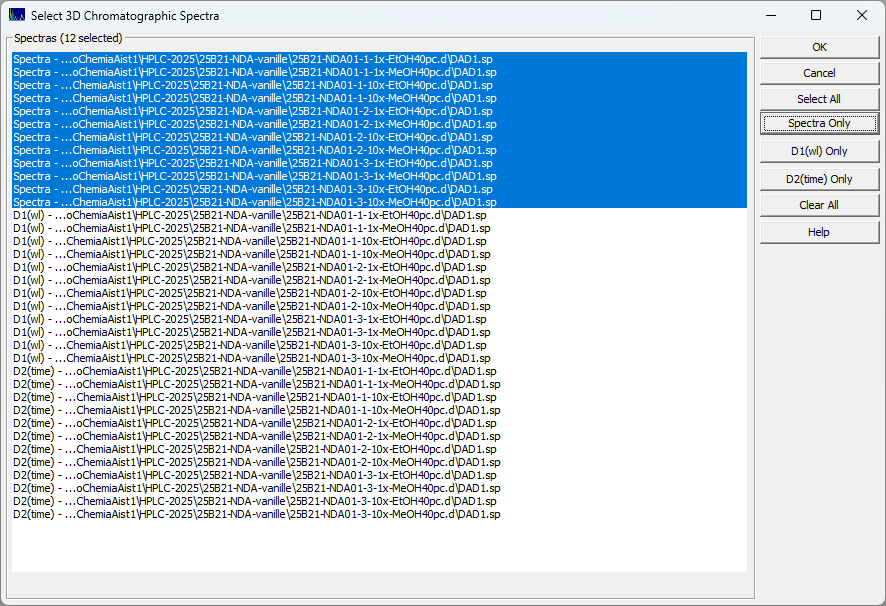
When you have imported DAD/PDA Spectra using the ChromSpec menu's Import Matrices option, all subsequent options that require a selection of a single or multiple spectra will display the following the dialog:
Automatic Creation of D1(wl) and D2(time) Matrices
When you import 3D chromatographic PDA/DAD spectra for any one of the three import methods, derivative matrices are also automatically created using an automated Savitzky-Golay algorithm that directly generates a first derivatives with respect to wavelength and a second derivative with respect to time.
Use the Spectra Only button to select just the spectral matrices as shown above. Use the D1(wl) Only button to select all first derivative spectra, and the D2(time) Only button to select all second derivative spectra. There are also Select All and Clear All options.
The main purpose of the D1 spectra is to find zones where the first
derivatives of the various components pass through zero. Please see the Fitting
Coeluting Peaks tutorial for using identified zero first derivative wavelength values for estimating
the areas of coeluting peaks with slightly different UV-VIS spectra.
The D1(wl) and D2(time) spectra are designed for the S/N of a typical DAD/PDA spectral matrix. If
your analysis has a low S/N due to very low concentrations or a very high sampling rate, or if you want
a different partial derivative, you may need to import the spectra as opposed to the precomputed derivative
spectra by extracting the wavelengths
or times
of interest for the chromatography or spectroscopy, and only then creating the first or second derivatives
with the DSP menu's Smooth
option.